Requesting and applying deposits
Set a fixed or percentage deposit on authorized work, record what the customer pays, and let the next invoice apply it automatically.
For service advisor, owner, manager · checked against the product on 2026-11-01
A deposit belongs to an order after the customer has authorized work and before an invoice exists. Open the order's payment controls and choose Take a deposit. An estimate that has not been approved cannot take one, and an invoiced order takes an ordinary invoice payment instead.
Set the amount you mean to collect
Step 1: Open the payment box on the order
Once the customer has approved work and before the invoice, it opens as Take a deposit.
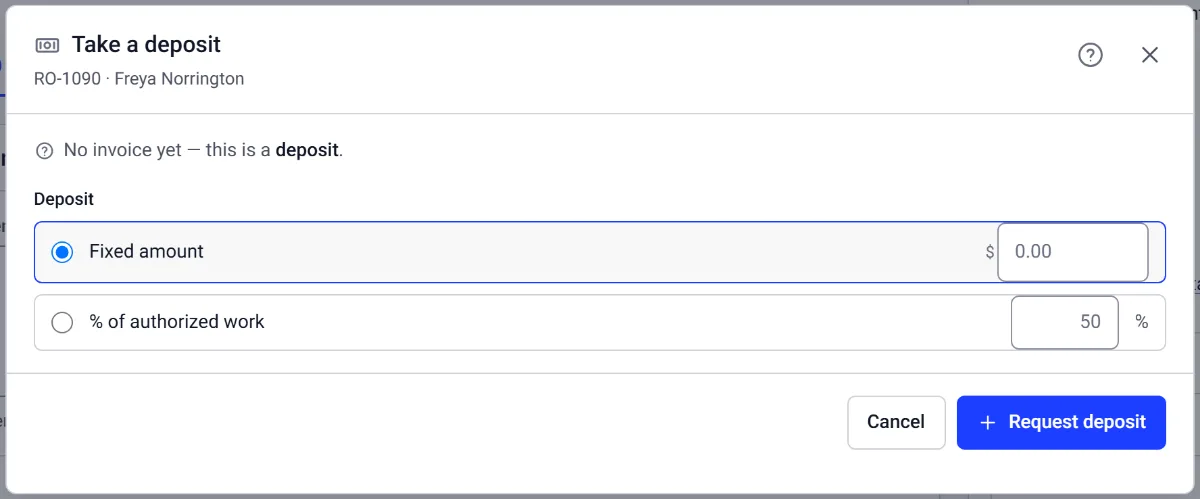
Step 2: Say how much
Choose Fixed amount or % of authorized work and press Request deposit.
Step 3: Take it when they pay
Open the payment box again and press Take deposit. It comes off the invoice when the invoice is issued.
Choose Fixed amount and enter the amount in the shop's currency, or choose % of authorized work and enter a whole number under Deposit percent. The percentage is calculated from the customer-visible work that has actually been approved, using the order's own rounding rule. Hidden or unapproved work is not quietly added to that base.
Press Request deposit. The amount must be positive and cannot take this order's deposit requests above its approved total. Torqix then reopens the same dialog on the payment step, so the request and the money received remain two separate facts.
Record what the customer paid
The dialog shows Deposit still to take. Enter a smaller Deposit amount when the customer is paying part now, or use Full deposit for the rest. Choose one of the shop's own payment types, add a Reference when it will help match a check or terminal receipt, and press Take deposit. A later payment can finish the same request, but no payment can take it past the requested balance.
Deposits never carry a tip. Each payment keeps the payment type, reference, person and time that were recorded, and sample work keeps its test stamp instead of entering a live shop's money.
Let the invoice use the deposit
There is no deposit-allocation screen to work through. When the next invoice is issued, Torqix applies as much of the available deposit as that invoice can use. If the deposit covers the invoice, the invoice is paid when it is issued; if it covers only part, the invoice shows the remaining balance. Any deposit left over remains available on the order for a later non-void invoice.
Voiding an invoice makes the deposit that invoice used available again. Torqix counts only non-void invoices when it works out how much deposit is still held, so the same money is not applied twice and is not stranded on a bill that no longer exists.