API keys and webhooks
Give an integration only the API scopes it needs, keep the one-time key safe, and receive signed webhook notices without exposing customer details in their bodies.
For owner, integration developer · checked against the product on 2026-11-03
Make an API key
Step 1: Open Connect other software
Go to Settings › Connect other software and find API keys.
Step 2: Say what it is for
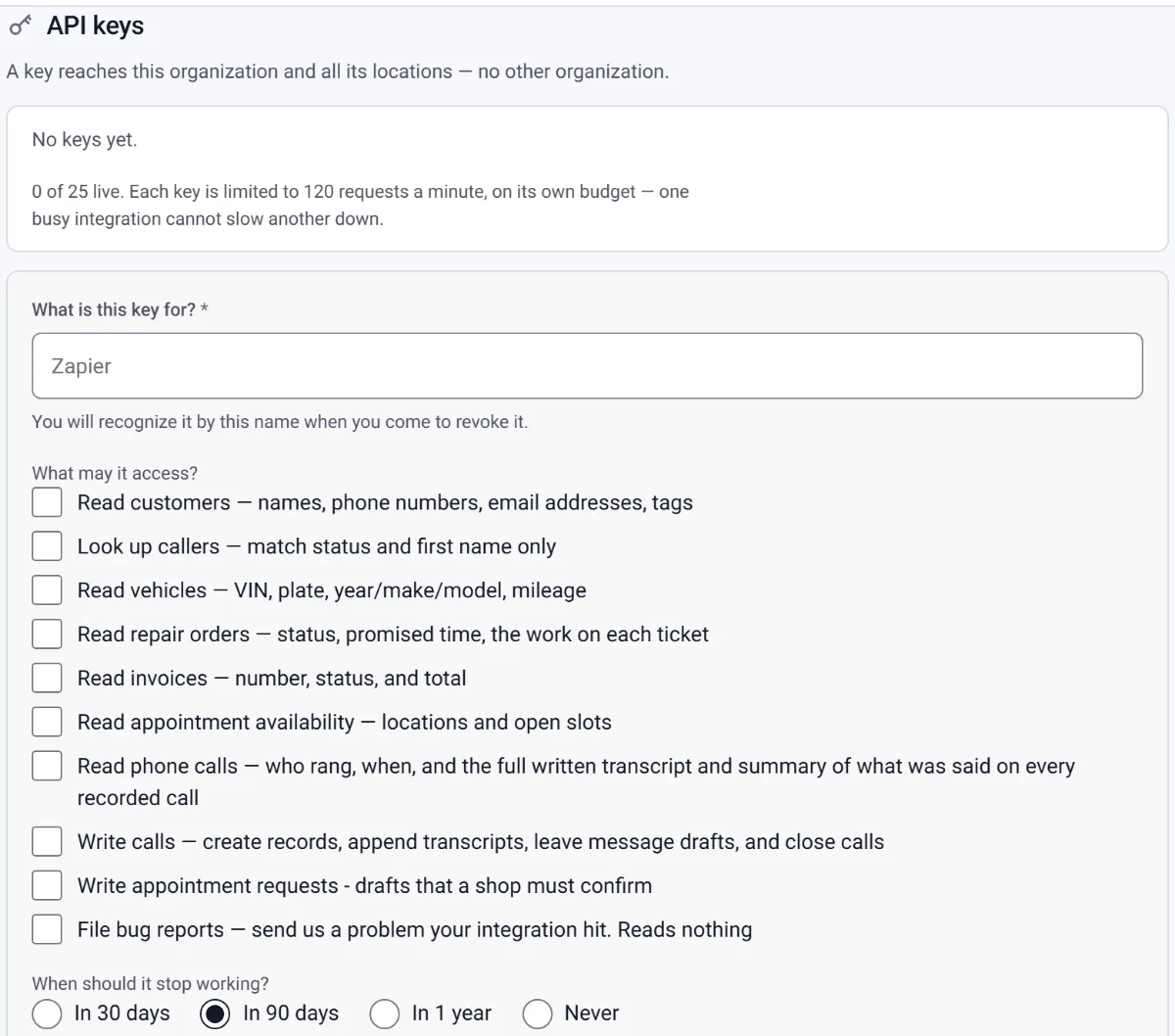
Fill in What is this key for? — Zapier, say — and under What may it access? tick only what it needs.
Step 3: Choose when it stops, then create it
Pick an answer under When should it stop working? and press Create key.
Step 4: Copy it straight away
The key is shown once: Copy this key now — it is not shown again. Lost it? Press Rotate beside it for a replacement.
What a key can reach
An owner manages both surfaces under Settings › Connect other software. An API key reaches this organization and all its locations, never another organization. There is no organization parameter; a route that takes shop_id accepts only a location in the key's organization.
Step 1: Name the integration
Under API keys, fill in What is this key for? with a name you will recognize later.
Step 2: Choose the smallest scopes
Under What may it access?, tick only what this integration needs. A key can have several scopes; none of them grants access to a different organization.
Step 3: Choose when it stops
Under When should it stop working?, pick 30 days, 90 days, 1 year or Never, then press Create key. New keys default to 90 days. Keys made before expiry existed have no expiry.
Step 4: Copy the key once
The next card says Copy this key now — it is not shown again. Send it on every request as
Authorization: Bearer <key>. Torqix later shows only its prefix. If the value is lost or exposed, revoke it and create another.
The API contract
- Base and reference
- Use
/v1on the API host for your deployment. The complete machine-readable contract is/openapi.jsonon that same host; no production hostname is assumed here. - Reads
- Scopes can read customers, look up a caller with a deliberately small result, and read vehicles, repair orders, invoices, appointment availability and call records.
- Narrow writes
calls:writecreates call records, appends transcripts, leaves message drafts and closes calls;appointment_requests:writecreates drafts a shop user must confirm;bug_reports:writefiles an integration problem and reads nothing. Every API write requires anIdempotency-Key. Reusing it with the same body within 24 hours returns the stored response instead of writing twice.- Expiry and rotation
- An expired key is refused exactly like a revoked one. Each key in the list says when it stops. Expires soon marks a key with 14 days or less left, and a note above the list counts them. Rotate makes a replacement with the same name and scopes, shown once, and the old key stops 7 days later so the integration has time to switch. The replacement keeps the old key's lifetime, so a key with no expiry is replaced by one with no expiry.
- Limits
- A shop can keep 25 live keys; revoked and expired keys do not count. Each key has its own limit of 120 requests per minute, so one integration does not spend another key's allowance.
Sending events to your server
Step 1: Add a public receiver
Under Webhooks, enter a public HTTPS address in Where should we POST?, choose Which events?, and press Add endpoint. A shop can keep up to 10 endpoints.
Step 2: Install the signing secret
Copy the value from Copy this signing secret now — it is not shown again. A Svix verification library can verify it as-is. The signed text is
id.timestamp.bodyfrom the raw body and thetorqix-webhook-id,torqix-webhook-timestampandtorqix-webhook-signatureheaders.Step 3: Test and watch deliveries
Press Send test event and read Recent deliveries. Product events cover repair-order status, estimate decisions, invoice changes, payments, refunds, appointments and completed inspections. Demo and imported data do not send webhooks.
A failed delivery gets six attempts with waits of one minute, five minutes, 25 minutes, two hours and six hours. Events stay ordered behind a retrying event and may arrive more than once, so deduplicate on torqix-webhook-id. Three events in a row exhausting every attempt stop the endpoint; 410 Gone stops it immediately. Fix the receiver and press Resume.