Add shop supplies and EPA fees automatically
Put a saved fee on every new service or once on every order, with an optional minimum and maximum. Draft prices stay current; approved prices stay frozen unless a rise reopens approval first.
For owner, manager, service advisor · checked against the product on 2026-11-03
Open Settings › Fees. A saved fee can stay Not automatic, be set to Add to every new service, or be set to Add once to every order. The first puts its own named fee on each service as that service is created. The second puts one named fee on the order when its first service is created.
Step 1: Set the charge
Choose a fixed amount or a percentage of labor, parts, or both. A percentage is calculated from the work after line discounts; outside work is not part of that basis.
Step 2: Choose where it is added
Use Add to every new service for a charge that belongs beside each service, or Add once to every order for one charge across the whole order. Leave Not automatic selected when an advisor should choose the fee from the order themselves.
Step 3: Set a floor or a cap
Minimum is the least the fee may charge and Maximum is the most. Leave either blank for no boundary. Type them in dollars and cents, such as 2.50 or 25.00. Torqix converts those entries to whole cents before storing them; no floating-point money reaches the fee. The percentage is rounded to cents once, then the minimum and maximum are applied.
Add a fee you charge often
Step 1: Open Fees
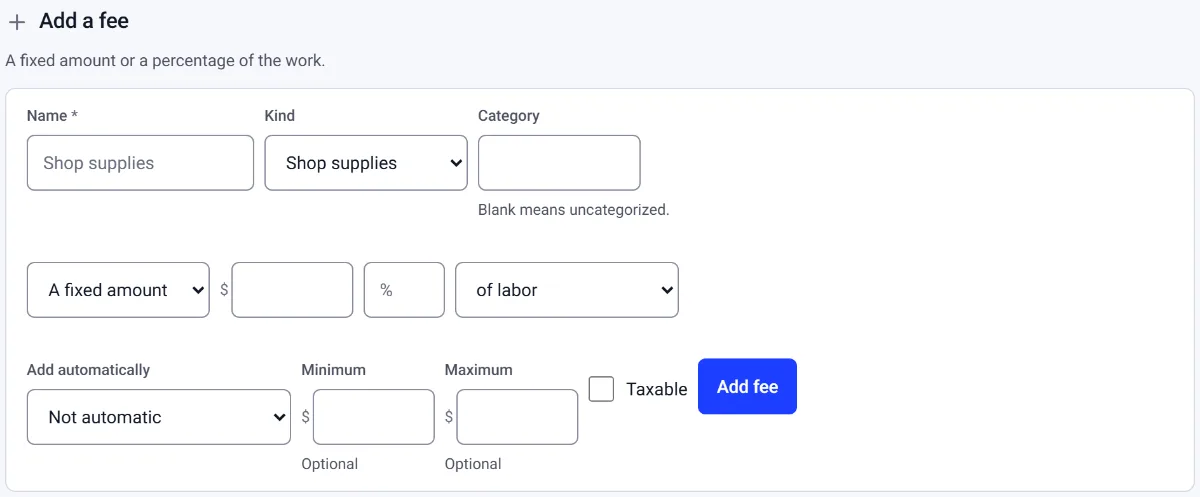
Go to Settings › Fees and find Add a fee.
Step 2: Name it and say how it is priced
Fill in Name and Kind, then the amount or percentage.
Step 3: Choose when it is added, then save
Under Add automatically, choose Add to every new service or Add once to every order, or leave it to add by hand. Press Add fee.
While the work changes
An engine-added fee follows changes to its labor and parts while its service is Draft or Pending approval. Add labor, change a quantity, change a line discount, or take a line off, and the fee is recalculated from the new basis. The fee row carries the quiet added automatically chip so an advisor can tell it from a charge somebody chose themselves.
Changing or retiring the saved fee never rewrites a price the customer already saw and approved. New draft work uses the active setting; signed work keeps the stamped cents, rate and basis that explain the charge on the customer's copy.